
AI coding assistants have opened up new ways of developing software products. How can we profit from these new capabilities while ensuring that the software is safe, secure and privacy-preserving? We have to ask ourselves a few questions when choosing their level of integration in the development process. We need to understand how AI is used nowadays in software development first.
Three levels of assistance
Software development tools leverage AI at various levels. Developers can choose to integrate them depending on the task at hand and project constraints:
- Basic writing help: minimal text autocompletion, grammar and consistency checks. These tools are almost always present and rely on simple, small AI models built into development suites.
- Local coding assistants: a growing number of openly available AI assistants that can be installed on the developer's machine or a private server. They handle fast, routine tasks well, but may struggle with the complexity of large projects.
- Cloud-based coding assistants: the most capable AIs are only available on the cloud, provided by a handful of companies, currently at very affordable prices.
Possible workflows
Since late 2023, development practices have expanded, allowing for much greater speed when needed (and appropriate).
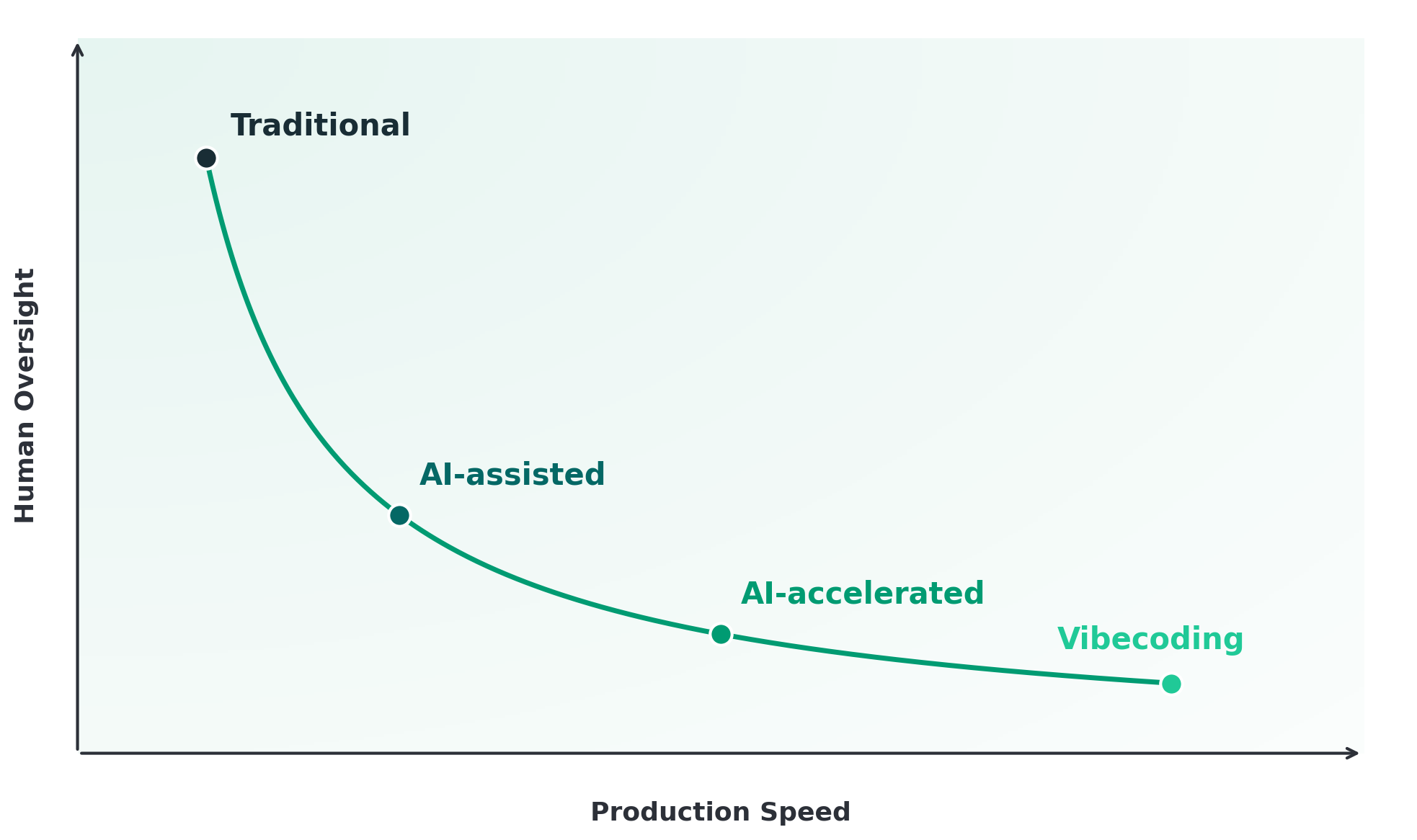
1. Traditional (handcrafted)
Low speed. The developer writes all code manually, using basic writing help at most. Full control, high cost and time.
2. AI-assisted
Moderate speed. The developer uses AI but retains full control. They may delegate writing a routine component or extracting a specification from a requirements document. They review every output and could usually produce same-or-better quality work on their own, given enough time.
3. AI-accelerated
High speed. AI generates substantial portions of the product from specifications and prompts. The developer acts as designer and reviewer, focusing on correctness and how the pieces fit together.
4. Vibecoding
Maximum speed. Plain language in, working application out. Minimal or no human review. Ideal for fast prototyping, but with tradeoffs in quality, security, and long-term maintainability.
Opportunities and risks
Recent workflows increase the speed and capabilities of the development team, but require increasing outsourcing of work. Let's weigh the tradeoffs:
| Speed | Outsourcing | |
|---|---|---|
| Opportunities | Faster time to market, rapid prototyping, more iterations in less time | Access to state-of-the-art performance: more competence in more fields |
| Risks | Accumulating hidden shortcuts that cost more to fix later, skipped review | Loss of understanding, harder troubleshooting, security and data protection blind spots |
Speed means more features realized in the same timeframe and as a consequence a wider technological reach: teams can tackle technologies and domains they wouldn't have explored on their own. The risk is that speed can come at the expense of careful review: shortcuts accumulate, and fixing them later often costs more than doing it right the first time.
Outsourcing here is literal: AI-powered code generation relies on sending context (prompts, excerpts of your project, specifications) to an external service. This raises questions about intellectual property and personal data protection that must be evaluated for each project.
The fit for your project
Not every project calls for the same workflow. Before choosing, consider four questions:
- What new capabilities could you unlock? AI assistance makes previously expensive features affordable. Think about ideas you dismissed in the past because they required too much development time or too specialized a skill set. Some of them may now be within reach.
- What is your critical intellectual property? Proprietary algorithms, business logic, and strategic data are what set you apart from competitors. Sending them to a cloud-based assistant means sharing them with an external service that may learn from them. It may be shortsighted to expose your core differentiators to a tool that could, in principle, benefit others.
- Does your project handle personal data? If so, using cloud-based assistants means that personal data (customer records, health information, financial details) may leave your infrastructure. This must be assessed against data protection regulations (such as GDPR) before any AI tool enters the workflow.
- Where would a failure hit hardest? Not all parts of a product carry the same risk. Identify the areas where a bug, a security flaw, or an incorrect result would cause the most damage: financial, reputational, or regulatory. Those areas must stay under strict human control.
Based on these answers, you can define which parts of your project follow which workflow — using speed where it's safe, and oversight where it matters most.
In short
AI can make software development faster, broader in scope, and more affordable, but not every task deserves the same level of automation.
A landing page, an internal dashboard, or a quick prototype to validate an idea? Go fast. AI-accelerated or even vibecoding workflows can deliver results in a fraction of the time and cost.
A payment system, a medical device, or anything handling sensitive customer data? Slow down. These need human oversight at every step, with AI limited to an assisting role at most.
Most projects live somewhere in between, and the right approach is often a mix: speed where it's safe, control where it counts.